
StayFit
StayFit
StayFit
Team Lead, UI/UX Designer
Team Lead, UI/UX Designer
Team Lead, UI/UX Designer
iOS App
iOS App
iOS App

Overview
Overview
Many older adults struggle to meet the recommended amount of physical activity, due to a lack of age-accessible fitness programs, as well as the physical limitations of aging itself. Gym programs are expensive and intimidating, and online resources are too generic and potentially unsafe, so it can feel impossible to get started. In fact, studies show that 80% of older adults want better health, but only 15% meet physical activity standards.
Many older adults struggle to meet the recommended amount of physical activity, due to a lack of age-accessible fitness programs, as well as the physical limitations of aging itself. Gym programs are expensive and intimidating, and online resources are too generic and potentially unsafe, so it can feel impossible to get started. In fact, studies show that 80% of older adults want better health, but only 15% meet physical activity standards.
How might we design a guided exercise platform that lowers the barrier to entry for seniors, ensuring they feel secure, capable, and motivated to maintain long-term physical activity?
How might we design a guided exercise platform that lowers the barrier to entry for seniors, ensuring they feel secure, capable, and motivated to maintain long-term physical activity?
Features
Features
Follow-along exercise guides
Form-correcting camera features
Calendar and reminders to stay on track
Local workshops and event discovery
Step goals and challenges with friends
Intuitive, accessible features and UI
Follow-along exercise guides
Form-correcting camera features
Calendar and reminders to stay on track
Local workshops and event discovery
Step goals and challenges with friends
Intuitive, accessible features and UI
Programs
Figma
Design Tool
Programs
Figma
Design Tool
Programs
Figma
Design Tool
Year
Year
2026
See Case Study
See Case Study


Process
Process
Project Theme
Every quarter, UC Irvine's design organization, Design @ UCI, hosts an 8-week program (Project Teams) where teams of 6 designers work on an app with a given theme, from ideation to prototype-complete. At the end, teams present to a panel of industry professionals.
In spring of 2026, I participated in Project Teams as a Team Lead. Given the theme of "Interacting with the Unfamiliar," we created Stay Fit to help older adults and seniors along a new journey of health and exercise.
User Research
As our team was not of the target demographic, we emphasized user research throughout our entire process. We conducted 2 surveys (with 50 total responses across older adults aged 55+ and caretakers), 3 interviews, and 6 usability tests to understand the experiences, habits, and preferences of the senior community, especially in relation to exercise and technology.
We learned that many older adults are motivated to maintain exercise schedules through social incentives, but not all live near friends/family. So, we implemented simple social features such as completing step challenges with friends, and discovering local events such as group yoga or community pickleball. To improve accessibility, we added a screen mirroring feature where users can follow along on a larger screen. We also found a highly promising use case for Stay Fit to be used in senior homes to host group workouts with the video tutorials displayed on TVs.
Through initial usability tests, we found that some users found it difficult to find all the features. To reduce confusion and empower tech-hesitant seniors, we incorporated contextual tutorials throughout the app that offered step-by-step guidance for each page.
Project Theme
Every quarter, UC Irvine's design organization, Design @ UCI, hosts an 8-week program (Project Teams) where teams of 6 designers work on an app with a given theme, from ideation to prototype-complete. At the end, teams present to a panel of industry professionals.
In spring of 2026, I participated in Project Teams as a Team Lead. Given the theme of "Interacting with the Unfamiliar," we created Stay Fit to help older adults and seniors along a new journey of health and exercise.
User Research
As our team was not of the target demographic, we emphasized user research throughout our entire process. We conducted 2 surveys (with 50 total responses across older adults aged 55+ and caretakers), 3 interviews, and 6 usability tests to understand the experiences, habits, and preferences of the senior community, especially in relation to exercise and technology.
We learned that many older adults are motivated to maintain exercise schedules through social incentives, but not all live near friends/family. So, we implemented simple social features such as completing step challenges with friends, and discovering local events such as group yoga or community pickleball. To improve accessibility, we added a screen mirroring feature where users can follow along on a larger screen. We also found a highly promising use case for Stay Fit to be used in senior homes to host group workouts with the video tutorials displayed on TVs.
Through initial usability tests, we found that some users found it difficult to find all the features. To reduce confusion and empower tech-hesitant seniors, we incorporated contextual tutorials throughout the app that offered step-by-step guidance for each page.
Project Theme
Every quarter, UC Irvine's design organization, Design @ UCI, hosts an 8-week program (Project Teams) where teams of 6 designers work on an app with a given theme, from ideation to prototype-complete. At the end, teams present to a panel of industry professionals.
In spring of 2026, I participated in Project Teams as a Team Lead. Given the theme of "Interacting with the Unfamiliar," we created Stay Fit to help older adults and seniors along a new journey of health and exercise.
User Research
As our team was not of the target demographic, we emphasized user research throughout our entire process. We conducted 2 surveys (with 50 total responses across older adults aged 55+ and caretakers), 3 interviews, and 6 usability tests to understand the experiences, habits, and preferences of the senior community, especially in relation to exercise and technology.
We learned that many older adults are motivated to maintain exercise schedules through social incentives, but not all live near friends/family. So, we implemented simple social features such as completing step challenges with friends, and discovering local events such as group yoga or community pickleball. To improve accessibility, we added a screen mirroring feature where users can follow along on a larger screen. We also found a highly promising use case for Stay Fit to be used in senior homes to host group workouts with the video tutorials displayed on TVs.
Through initial usability tests, we found that some users found it difficult to find all the features. To reduce confusion and empower tech-hesitant seniors, we incorporated contextual tutorials throughout the app that offered step-by-step guidance for each page.
Iteration and Adding New Features
Throughout the design process, we continually iterated based on feedback from older adults and caretakers. In our visual design, we cycled through different color palettes before settling on neutrals and subtle blues to reduce distraction and guide users to action items. We also implemented larger font sizes, customizable accessibility settings, and clear tutorials.
After conducting initial usability tests and a second round of surveys, one issue seemed to rise above all others: safety. Safety was a concern for 80% of respondents, and 22% indicated concern of injury as the primary reason for not exercising. Video guides were not enough to guarantee safety, as it is difficult to verify proper form.
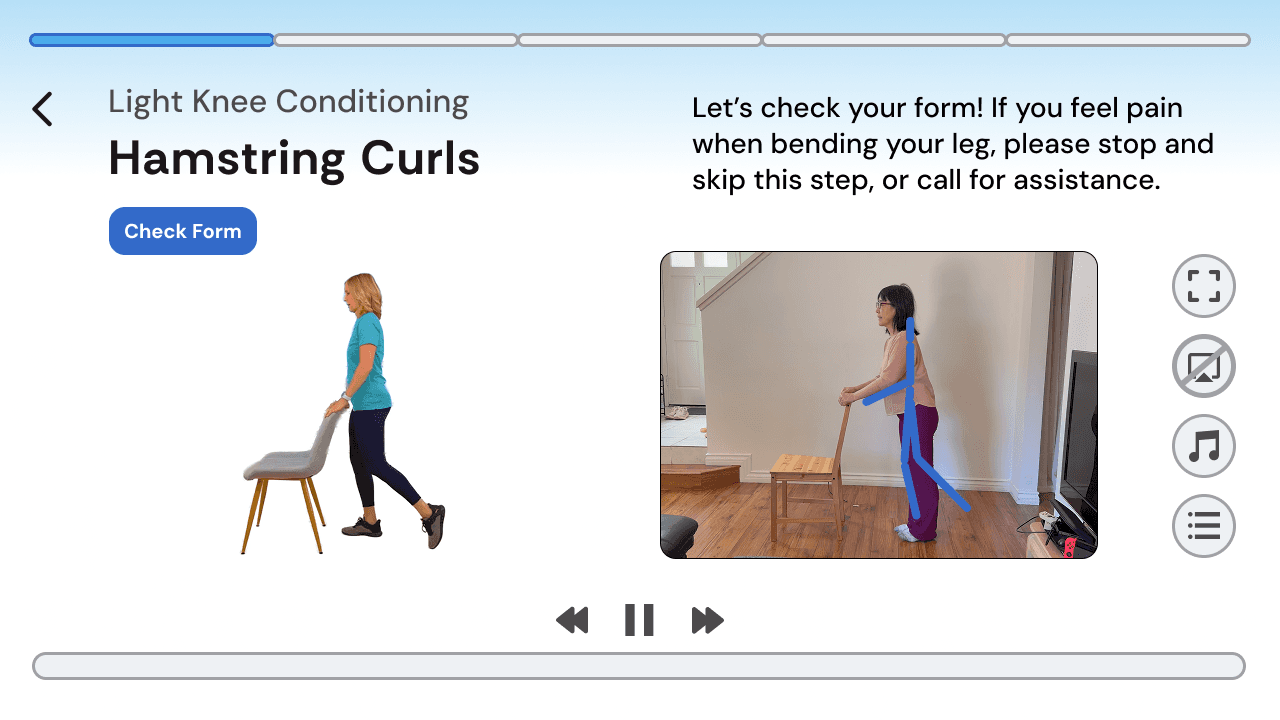
To address this, we implemented a form correction tool that would use the phone's camera to match poses and ensure that the user was following the exercise safely and accurately, with warnings with each misstep. When screen mirroring to a TV, the user would still be able to use the phone's camera for this function.
Iteration and Adding New Features
Throughout the design process, we continually iterated based on feedback from older adults and caretakers. In our visual design, we cycled through different color palettes before settling on neutrals and subtle blues to reduce distraction and guide users to action items. We also implemented larger font sizes, customizable accessibility settings, and clear tutorials.
After conducting initial usability tests and a second round of surveys, one issue seemed to rise above all others: safety. Safety was a concern for 80% of respondents, and 22% indicated concern of injury as the primary reason for not exercising. Video guides were not enough to guarantee safety, as it is difficult to verify proper form.
To address this, we implemented a form correction tool that would use the phone's camera to match poses and ensure that the user was following the exercise safely and accurately, with warnings with each misstep. When screen mirroring to a TV, the user would still be able to use the phone's camera for this function.
Iteration and Adding New Features
Throughout the design process, we continually iterated based on feedback from older adults and caretakers. In our visual design, we cycled through different color palettes before settling on neutrals and subtle blues to reduce distraction and guide users to action items. We also implemented larger font sizes, customizable accessibility settings, and clear tutorials.
After conducting initial usability tests and a second round of surveys, one issue seemed to rise above all others: safety. Safety was a concern for 80% of respondents, and 22% indicated concern of injury as the primary reason for not exercising. Video guides were not enough to guarantee safety, as it is difficult to verify proper form.
To address this, we implemented a form correction tool that would use the phone's camera to match poses and ensure that the user was following the exercise safely and accurately, with warnings with each misstep. When screen mirroring to a TV, the user would still be able to use the phone's camera for this function.

Future Development
If Stay Fit were to develop into a functioning app in the App Store, we would work with developers and engineers to make the form correction tool a reality, and also add live coaching support where users could message coaches for more personalized assistance. We would also implement safeguards in other areas of the app, such as verification for events posted in the discovery page.
During this 8-week design process, we focused on fleshing out the features that would most benefit our users, making informed decisions from continuous user feedback.
Future Development
If Stay Fit were to develop into a functioning app in the App Store, we would work with developers and engineers to make the form correction tool a reality, and also add live coaching support where users could message coaches for more personalized assistance. We would also implement safeguards in other areas of the app, such as verification for events posted in the discovery page.
During this 8-week design process, we focused on fleshing out the features that would most benefit our users, making informed decisions from continuous user feedback.
Future Development
If Stay Fit were to develop into a functioning app in the App Store, we would work with developers and engineers to make the form correction tool a reality, and also add live coaching support where users could message coaches for more personalized assistance. We would also implement safeguards in other areas of the app, such as verification for events posted in the discovery page.
During this 8-week design process, we focused on fleshing out the features that would most benefit our users, making informed decisions from continuous user feedback.

Next Project
Next Project
Next Project
Alien Stage University
Alien Stage University
Alien Stage University
->
->